Every software you use runs on data. Without data, a software is just an HTML skeleton. Apps like YouTube wouldn’t have videos, and WhatsApp wouldn’t have messages. All the content, messages, and information you see exists because data is constantly being stored and delivered.
This data is stored on powerful computers called servers, which send information whenever your device requests it. To communicate with these servers, developers use tools like cURL, which allows them to send requests and receive responses directly from the terminal. Understanding cURL helps you see how software communicates with servers behind the scenes.
Let’s understand it step by step.
What is a Server?
A server is simply a computer that stores data and responds to requests from other computers.
A server is nothing but just another computer device which is 24×7 on and have a public IP address. It can store data, run logic on data and send responses. We need to talk to server.
For example:
A website server sends webpages
An API server sends data
A mail server sends emails
Your browser talks to servers automatically.
But programmers often need to talk to servers manually.
That’s where cURL helps.
What is cURL?
cURL (Client URL) is a command-line tool used to send requests to servers and receive responses.
In simple terms:
cURL lets you talk to a server from your terminal.
Formally curl is a command line tool which which is used to transfer data to or from a server using URL.
Instead of using a browser, you can type a command and directly communicate with the server.
Think of it like sending a message to a server and seeing the reply instantly.
Why Programmers Need cURL
Programmers use cURL to:
Test APIs
Debug backend services
Check if servers are working
Send data to servers
Fetch data from servers
It is one of the most important tools in backend development.
For example, instead of opening a browser, you can directly request a webpage using cURL.
Your First cURL Command
Let’s start with the simplest example.
Open your terminal window and type the following command:
curl https://example.com
What this does:
Sends a request to the server at example.com
The server responds with webpage data
cURL prints the response in your terminal
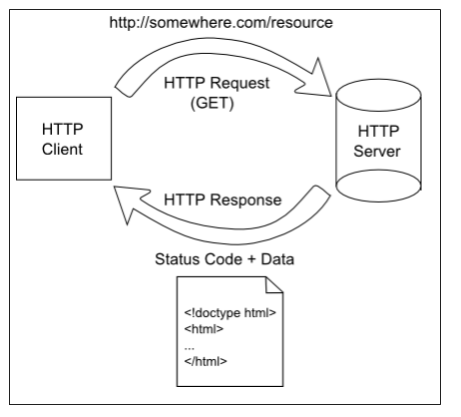
Flow:
cURL → Server → Response → Terminal
You just talked to a server.
If you want to use curl in windows powershell use curl.exe as using just curl invokes windows Invoke-WebRequest.
Understanding Request and Response
Whenever you use cURL, two things happen:
Request → sent by you
Response → sent by the server
Think of it like a conversation.
You: "Give me the webpage"
Server: "Here it is"

What the Server Response Contains
A server response usually includes:
Status code : This is a number that represents the state of the response i.e. the request which they sent was successful, pending or unsuccessful.
Data : This is the data that the client requested.
Headers : These have some data about the request and the response. Mainly metadata.
Example response data:
<html>
  <h1>Welcome to Example.com</h1>
</html>
What is this?
This is the webpage content returned by the server.
What is a Status Code?
A status code is a three-digit number issued by a server in response to a client's request (like a web browser asking for a page). It indicates whether the request was successful, if further action is needed, or if an error occurred.
A status code tells you what happened.
HTTP status codes are grouped into five classes based on their first digit:
| Status Code | Meaning | Example |
|---|---|---|
| 1xx | Informational | 100 --> Continue |
| 2xx | Success | 200 --> Success |
| 3xx | Redirection | 301 --> Moved Permanently |
| 4xx | Client Error | 404 --> Not Found |
| 5xx | Server error | 500 --> Server Error |
If the server returns:
200 OK
It means everything worked.
How cURL Talks to APIs
An API is a server that provides data instead of webpages.
For example, you can fetch sample API data:
curl https://jsonplaceholder.typicode.com/posts/1
Response:
{
  "userId": 1,
  "id": 1,
  "title": "Sample title",
  "body": "Sample content"
}
This is data returned by the server.
This is how frontend apps talk to backend servers.
Understanding GET Requests
By default, cURL makes a GET request.
GET means:
"Give me data"
Example:
curl https://api.github.com
This asks the server to send data.
No extra configuration needed.
Understanding POST Requests
POST means:
"Send data to the server"
Example:
curl -X POST https://jsonplaceholder.typicode.com/posts \
-d "title=Hello&body=World"
This sends data to the server.
Server responds with confirmation.
Flow:
cURL → sends data → Server → responds
POST is used for:
Login
Creating accounts
Sending forms
Uploading data
Browser vs cURL (Conceptual Difference)
Browser:
Browser → Server → Shows webpage visually
cURL:
cURL → Server → Shows raw response
Browser shows formatted output.
cURL shows raw data.
This helps developers debug systems.
Where cURL Fits in Backend Development
cURL is used everywhere in backend work:
Testing APIs
Debugging microservices
Checking server health
Verifying deployments
Backend engineers use cURL daily.
Common Beginner Mistakes
Here are common mistakes beginners make:
Mistake 1: Forgetting https://
Wrong:
curl example.com
Correct:
curl https://example.com
Mistake 2: Thinking cURL is only for APIs
cURL works with:
Websites
APIs
Local servers
Any HTTP server
Mistake 3: Expecting formatted output
cURL shows raw response.
This is normal.
Mistake 4: Thinking cURL is complicated
Basic usage is simple:
curl URL
That’s enough to get started.
Visual Flow Diagram
Real-World Example (Testing Your Backend)
If your backend runs at:
http://localhost:3000/users
You can test it using:
curl http://localhost:3000/users
This helps verify your server works.
Why cURL is So Important
cURL helps developers:
Talk to servers directly
Test backend systems
Debug issues quickly
Understand HTTP communication
It gives you full control.
Final Conclusion
cURL is a command-line tool used to communicate with servers.
It allows developers to send requests and receive responses directly from the terminal.
With cURL, you can:
Fetch webpages
Talk to APIs
Send data to servers
Debug backend systems
In this guide, we discussed the two most common HTTP methods: GET and POST. By default, cURL uses the GET method, so specifying it explicitly is optional.
cURL is one of the most essential tools every programmer should learn because it helps you understand and control how software communicates with servers.
Comments
Join the discussionNo comments yet. Be the first to comment.

